


 Terraria
 If your mods require a newer (or specific) version of tModLoader, you can update it directly from the game panel. This is a two-step process: set the version, then reinstall the server to apply it.
How to update tModLoader
Find the version you need on the tModLoader GitHub releases page. Most users should stick with “Latest” unless a mod specifically requires an older version.
In the game panel, go to your server’s Server Options page.
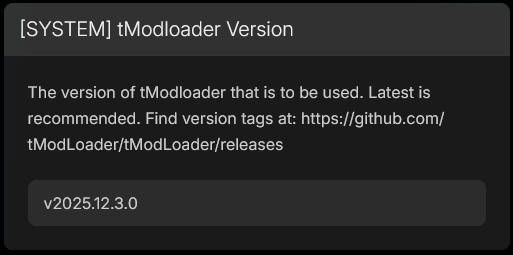
Find the [SYSTEM] tModloader Version field. Enter the version tag exactly as it appears on GitHub (e.g.
v2025.12.3.0), or typeLatestto always pull the newest stable release.
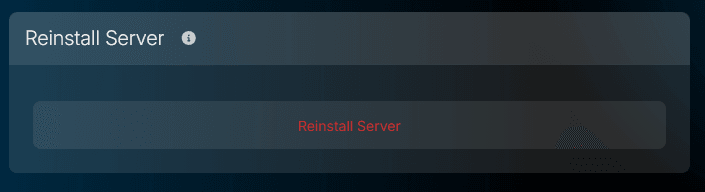
Navigate to Advanced → Server Actions.
Click the Reinstall Server button.
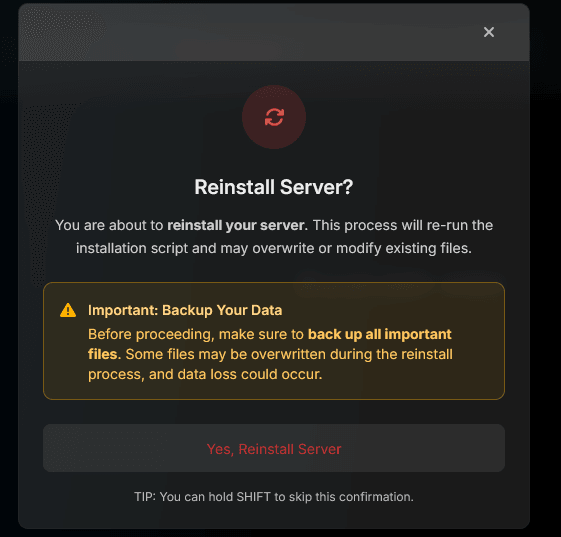
- A confirmation dialog will appear warning that files may be overwritten. Click Yes, Reinstall Server to proceed.
Wait for the reinstall to finish. This usually only takes a moment.
Start your server. It will now be running the tModLoader version you specified.
After updating
Once the server is running on the new version, make sure the tModLoader version on your PC matches. Open Steam, and if tModLoader has an update available, install it. All players connecting to the server need to be on the same tModLoader version.
If you’re running mods that were built for the previous tModLoader version, check each mod’s Steam Workshop page or GitHub for an updated release. Mod version mismatches are the most common cause of startup failures after a tModLoader update - we see this in tickets regularly. The server log will usually tell you exactly which mod is incompatible, so check the console output if the server fails to start.
Haven’t set up tModLoader yet?
If your server isn’t running tModLoader at all and you need to get started from scratch, check out our guide on Adding Mods to your Terraria Server first.
Frequently Asked Questions
No. Reinstalling re-runs the installation script with the new tModLoader version. Your world data, player files, and mod files (.tmod) are preserved. We still recommend keeping a backup before any reinstall, but in practice only the server binary and tModLoader files are replaced.
For most users, 'Latest' is the right choice. If a specific mod requires an older version, check that mod's page for the exact tModLoader version tag it supports, then enter that tag in the version field.
Version tags are listed on the tModLoader GitHub releases page at https://github.com/tModLoader/tModLoader/releases. The tag format looks like v2025.12.3.0.