


 ARK: Survival Evolved
 ARK’s server settings live in two .ini files, and most of them can also be passed as command line arguments. Here is where the files are and how to change them.
Quick answer
- Both files are in
/ShooterGame/Saved/Config/LinuxServer, reachable from File Manager in your server’s sidebar. GameUserSettings.iniarrives with defaults filled in. Most server settings go under[ServerSettings].Game.inistarts empty. You add the section headers and settings yourself.- No file editing needed: most options also work as command line arguments through the Additional Arguments server option.
- The ARK Wiki documents every option, including the command line only ones. Every setting described on this page is from there.
Locating the configuration files
ARK has two main configuration files when it comes to server behavior, GameUserSettings.ini and Game.ini. Open File Manager from your server’s sidebar and navigate to /ShooterGame/Saved/Config/LinuxServer.
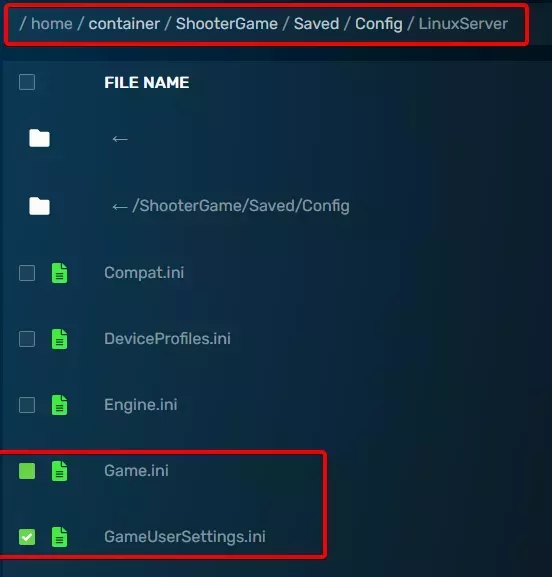
Using the .ini files
Between them, the two files hold nearly every server and client option. Client options have no effect on your server, but they can sit in the file harmlessly.
GameUserSettings.inicontains a set of defaults. Plenty of valid options are missing from it and you append those into the right section yourself. Sections are titled in[], and settings recommendations usually name the section an option belongs to.Game.iniis empty until you write to it. It is also the only home for the[/script/shootergame.shootergamemode]options, which cannot be set on the command line.
Using the command line
Most configuration options work on the command line as well, and some work only there. Add them through the Additional Arguments server option, using the name the option has in its configuration file prefixed with a space and -, followed by = and the value.
Arguments the Wiki writes with a ? can be split apart the same way, which is usually easier to read. Instead of ?AllowAnyoneBabyImprintCuddle=true?AllowFlyerCarryPvE=true, write -AllowAnyoneBabyImprintCuddle=true -AllowFlyerCarryPvE=true.
Common configuration options
These are the settings people change most often, and they double as an example of how to find and set any other option. None of them are present by default, so append each one under the section header listed below.
| Setting | File | Section | Default | What it changes |
|---|---|---|---|---|
XPMultiplier | GameUserSettings.ini | [ServerSettings] | 1.0 | Scales experience earned by players, tribes, and dinosaurs for every action. 1.0 matches singleplayer and official servers. Note that patch 313.5 activated an additional hardcoded multiplier of 4 on top of whatever you set. |
TamingSpeedMultiplier | GameUserSettings.ini | [ServerSettings] | 1.0 | Scales dinosaur taming speed. Higher values tame faster. |
HarvestAmountMultiplier | GameUserSettings.ini | [ServerSettings] | 1.0 | Scales yields from all harvesting: chopping trees, picking berries, carving carcasses, mining rocks. Higher values return more materials per strike. |
GlobalSpoilingTimeMultiplier | Game.ini | [/script/shootergame.shootergamemode] | 1.0 | Scales the spoiling time of perishables globally. Higher values prolong the time before items spoil. |
Frequently Asked Questions
GameUserSettings.ini and Game.ini are in /ShooterGame/Saved/Config/LinuxServer. Open File Manager from your server's sidebar and navigate to that folder.
GameUserSettings.ini arrives with a set of defaults already filled in, and most server settings go under its [ServerSettings] header. Game.ini is empty until you write to it, so you add the section headers and settings yourself. Game.ini is also the only home for the [/script/shootergame.shootergamemode] options, which cannot be set on the command line.
Yes. Most options also work as command line arguments, which you add through the Additional Arguments server option. Some options work only on the command line, and the [/script/shootergame.shootergamemode] options in Game.ini work only in the file.