


Point a domain you own at your WinterNode game server so players can connect with a clean address like play.example.com instead of a numeric IP and port.
What You Need
- A domain you own (purchased from a registrar like Cloudflare, Porkbun, etc.)
- Access to your domain’s DNS settings
- Your server’s IP address and port from the Game Panel (under Management → Allocations)
Create an A Record
The A record points your subdomain to your server’s IP address.
- Open your domain’s DNS management page
- Click Add Record and set:
- Type:
A - Name: The subdomain you want (e.g.
play,mc,vs) - IPv4 address: Your server’s IP address without the port
- TTL:
Auto - Proxy status (if available):
DNS Only
Your A record should look something like this: 
Create an SRV Record
If your server uses a shared IP (i.e. it has a non-default port), you need an SRV record so players don’t have to type the port. This only works for games that support SRV. See the table below.
- Click Add Record and set:
- Name:
<service>._tcp.<subdomain>- replace<service>with the prefix from the table below and<subdomain>with the subdomain from your A record. For the root domain, use@instead of a subdomain. - Priority:
0 - Weight:
0 - TTL:
Auto - Port: Your server’s port (from Management → Allocations)
- Target: The full A record subdomain (e.g.
play.example.com)
Example for Minecraft: To make play.example.com work, with an A record named play, the SRV record name would be _minecraft._tcp.play.
Your SRV record should look something like this: 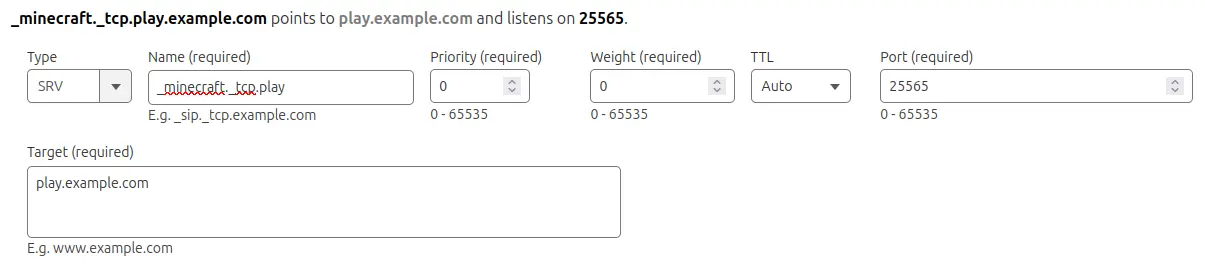
After DNS propagates, players can connect using just your subdomain (e.g. play.example.com).
Games with Known SRV Support
| Game | SRV Service Prefix | Example SRV Name |
|---|---|---|
| Minecraft: Java Edition | _minecraft | _minecraft._tcp.play |
| Vintage Story | _vintagestory | _vintagestory._tcp.play |
Verify DNS Propagation
DNS changes can take anywhere from a few minutes to 72 hours to propagate worldwide.
- Go to dnschecker.org
- Enter your subdomain (e.g.
play.example.com) to check the A record - To check an SRV record, prepend the service prefix: e.g.
_minecraft._tcp.play.example.com
Once propagation is complete, players can connect using your domain.
Frequently Asked Questions
No. SRV record support depends on the game. See the table in this article for games with known SRV support. For games without SRV support, players connect using your subdomain plus the port (e.g. play.example.com:12345).
No. A Dedicated IP uses the game's default port, so an A record alone is enough. Players just enter the domain.
Usually a few minutes, but it can take up to 72 hours. Use dnschecker.org to check propagation status.